

Microsoft Clarity vs Google Analytics GA4
If you’re trying to grow your website—more leads, more sales, lower bounce rate—you need to understand two things:
- What visitors are doing (quantitatively): pages viewed, traffic sources, conversions, drop-off points.
- Why they behave that way (qualitatively): confusion, rage clicks, dead clicks, scrolling patterns, UX friction.
That’s exactly where Google Analytics (GA4) and Microsoft Clarity shine—each in a different way. Google Analytics is your measurement system for performance and outcomes. Clarity is your “behavior microscope” that shows what people actually experience.
In this breaks down what each tool can do, when to use one vs the other, and how Trech Hub can implement them to turn data into conversions.
What can Google Analytics do?
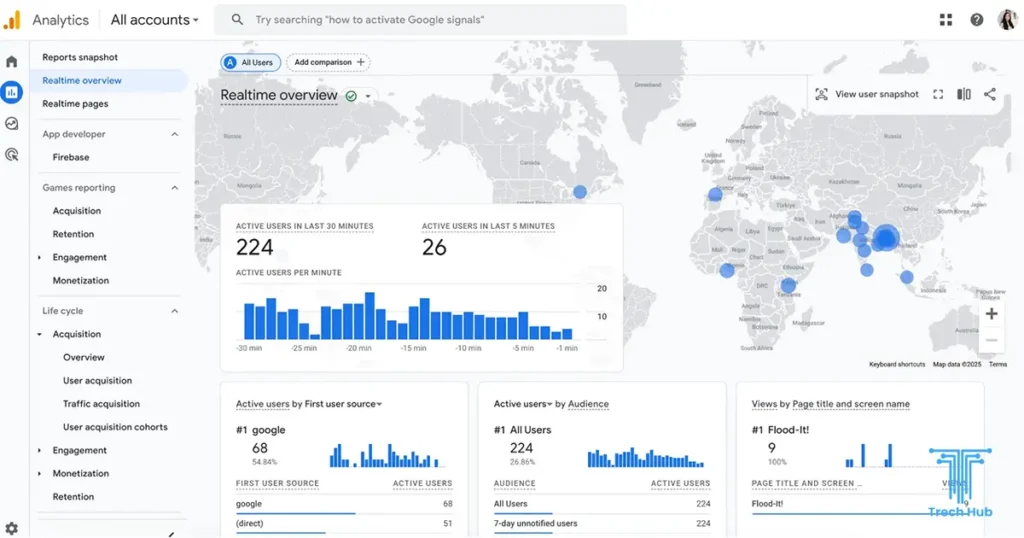
Google Analytics (GA4) is built for traffic analysis and conversion measurement. It helps you answer questions like:
- Where are users coming from? (Organic search, ads, social, referrals, email)
- Which pages drive the most engagement and conversions?
- What actions do users take before converting?
- Where do users drop off in a funnel?
- Which campaigns generate real revenue/leads?
Key GA4 capabilities (practical, not buzzwords)
- Acquisition reporting: channels, source/medium, campaign performance (including UTM tracking).
- Engagement tracking: sessions, engaged sessions, engagement time, views per page, events.
- Event-based measurement: clicks, scrolls, file downloads, form submissions, video engagement.
- Conversions: define key events (e.g., “lead_submit”, “purchase”) and track performance over time.
- Funnel exploration: build funnels to see where users abandon the journey (e.g., landing page → pricing → contact form → thank-you page).
- Audience segmentation: compare behavior by location, device type, campaign, returning vs new users, etc.
- Integration ecosystem:
- Google Ads (campaign optimization)
- Search Console (SEO insights)
- BigQuery (advanced analysis)
- Looker Studio (dashboards)
What can Microsoft Clarity do?
Microsoft Clarity focuses on user behavior and UX friction through visual and session-based insights. It helps you answer questions like:
- Are users actually seeing my CTA?
- Why are people leaving the page?
- What’s causing confusion or frustration?
- Which elements are getting ignored—or clicked repeatedly because they don’t work?
Key Clarity capabilities
- Session recordings: watch real user sessions (anonymized) to see clicks, scrolls, hesitations, and navigation patterns.
- Heatmaps:
- Click heatmaps: where users click most (and what they try to click).
- Scroll heatmaps: how far visitors scroll and what they miss.
- Attention heatmaps (where available): areas users spend time on.
- Rage clicks / dead clicks:
- Rage clicks: repeated clicking (often frustration).
- Dead clicks: clicks on elements that don’t respond (UX or technical issue).
- Quick filters and diagnostics:
- Filter recordings by device, country, page, referrer, or session attributes.
- Identify top pages with friction signals.
- Integration with GA4: connect both to correlate behavior with outcomes.
Microsoft Clarity vs Google Analytics: The core difference
- Google Analytics tells you what happened and how often.
- Microsoft Clarity shows you why it happened and what it felt like to users.
You can make strong decisions with GA4 alone, but you’ll often be guessing why users drop off. Clarity reduces guessing by showing real sessions and interaction patterns.
Comparison table: Microsoft Clarity vs Google Analytics (GA4)
| Feature / Use Case | Microsoft Clarity | Google Analytics (GA4) |
| Primary purpose | UX + behavior insights | Performance + measurement |
| Best for | Conversion rate optimization (CRO), UX debugging | Marketing ROI, acquisition, funnels, conversion tracking |
| Heatmaps | ✅ Yes (click/scroll/attention) | ❌ No (not natively) |
| Session recordings | ✅ Yes | ❌ No (not natively) |
| Rage/dead click detection | ✅ Yes | ❌ No |
| Funnels and user journeys | Limited (behavioral insights) | ✅ Strong funnel exploration and path analysis |
| Events & conversions | Basic | ✅ Advanced (event-based model, conversion events) |
| Attribution & channels | Limited | ✅ Strong (source/medium, campaigns, multi-channel insights) |
| SEO analysis support | Indirect (UX improvements) | ✅ Direct (traffic + landing page performance; with Search Console) |
| Ads optimization | ❌ Not core | ✅ Strong (Google Ads integration) |
| Setup complexity | Easy | Moderate (needs correct event/conversion setup) |
| Best when | You want to see user friction and UI problems | You want to measure growth, campaign ROI, conversions |
When should you use Clarity, GA4, or both?
Use Google Analytics (GA4) if you need to:
- Prove marketing ROI (SEO, Google Ads, Social)
- Track leads/sales accurately
- Understand performance by channel and campaign
- Build conversion funnels and compare segments
Use Microsoft Clarity if you need to:
- Diagnose why users aren’t converting
- Improve page UX and layout (landing pages, service pages, checkout)
- Find hidden issues (dead clicks, rage clicks, confusing navigation)
- Validate design changes with real session behavior
Use both together if you want growth
Most businesses benefit from this combination:
- GA4 shows: “Our contact form conversion rate dropped 20% on mobile.”
- Clarity shows: “Mobile users are rage-clicking the dropdown because it’s broken.”
That’s how you move from “data” to action.
What to track (a practical checklist)
GA4 tracking essentials (for lead-gen websites)
- Contact form submit (thank-you page event or form_submit event)
- Click-to-call / click-to-WhatsApp
- Email clicks
- Key button clicks (CTA: “Get a Quote”, “Book a Call”)
- Scroll depth on long pages (service pages, blog posts)
- File downloads (PDF portfolio, pricing sheet)
Clarity essentials (for UX + conversion improvements)
- Heatmaps for:
- Homepage
- Top service pages
- Pricing page
- Contact page
- Recordings filtered by:
- Mobile traffic
- Paid campaign traffic
- Users who didn’t convert (to see what stopped them)
- Review “Top rage click pages” monthly
Implementation tips (especially for WordPress sites)
Install both tracking scripts properly
- GA4: ensure the GA4 tag loads on every page and conversions are configured.
- Clarity: ensure it’s installed site-wide (and tested in Clarity dashboard).
Avoid double tracking
- If you use multiple plugins (GTM + theme insert + analytics plugin), you can accidentally track twice.
Use Google Tag Manager (recommended)
- Cleaner tracking management
- Easier event setup
- Better long-term scalability
Create a measurement plan
Before installing anything, define:
- Your top 1–3 conversions (leads, sales, bookings)
- The user journey (landing → service → pricing → contact)
- The KPIs you’ll check weekly vs monthly
Privacy and compliance notes (important in the EU)
Both tools can be used in privacy-conscious ways, but you must implement them correctly:
- Configure cookie consent properly (especially if you serve EU users).
- Use anonymization and avoid collecting sensitive personal data.
- Ensure your privacy policy mentions the tools and purpose.
If you’re operating in Spain/EU, this part matters a lot—and it’s also where many websites get it wrong.
How Trech Hub helps you turn analytics into revenue
Installing analytics is easy. Using it to increase conversions is the real skill. At Trech Hub, we help you go beyond “numbers” and into decisions that grow your business.
What we can do for you
- GA4 + Clarity setup (clean and compliant)
Proper installation, event tracking, conversion setup, and QA testing. - Conversion tracking for WhatsApp, calls, and forms
So you know exactly what drives leads. - CRO audits using Clarity recordings + GA4 funnels
We identify friction, propose changes, and validate improvements. - Monthly performance reporting
Clear dashboards + actionable recommendations (not confusing metrics).
Want us to set up GA4 + Microsoft Clarity and show you exactly where you’re losing leads?
Contact Trech Hub for a tracking + conversion audit, and we’ll deliver a clear action plan to improve performance.
Final verdict: Which one is better?
It’s not really a battle—they’re built for different jobs:
- Choose Google Analytics (GA4) for measurement, channels, and conversion performance.
- Choose Microsoft Clarity for UX insight, friction detection, and behavior visibility.
- Choose both if you want a complete growth system.