

Search visibility is one of the most critical factors for online success. Whether you run an e-commerce store, a SaaS platform, or a corporate website, understanding how your site performs in Google search results is essential.
Google Search Console is one of the most powerful free tools available for website owners, SEO professionals, and digital marketers. It allows you to monitor performance, detect technical issues, and improve how your website appears in Google Search.
In this complete guide, we explain what Google Search Console is, how it works, and how businesses can use it to increase organic traffic in 2026.
What is Google Search Console?
Google Search Console (GSC) is a free platform provided by Google that helps website owners monitor, maintain, and improve their site’s presence in Google Search results.
With Google Search Console, you can:
- Track how often your website appears in search
- Identify which keywords generate traffic
- Detect indexing or technical errors
- Submit sitemaps for faster indexing
- Improve mobile usability and Core Web Vitals
- Monitor backlinks and internal links
In short, Google Search Console is the central control panel for understanding how Google interacts with your website.
Why Google Search Console Is Essential in 2026
Search engines have evolved significantly in recent years. Google’s algorithms now rely heavily on:
- Search intent
- Page experience
- Core Web Vitals
- Structured data
- AI-driven ranking signals
Because of these changes, Google Search Console has become an indispensable SEO tool for businesses that want to remain competitive.
Key benefits
| Benefit | Description |
| Performance insights | Understand which keywords bring traffic |
| Technical diagnostics | Detect indexing and crawling issues |
| Page experience monitoring | Evaluate mobile usability and Core Web Vitals |
| Search appearance optimisation | Improve rich results and structured data |
| Faster indexing | Submit URLs and sitemaps |
Companies that actively monitor Google Search Console are able to identify SEO opportunities much faster than those relying solely on analytics tools.
Key Features of Google Search Console
1. Performance Reports
The Performance report shows how your website performs in Google Search.
You can analyze:
- Total clicks
- Total impressions
- Average click-through rate (CTR)
- Average search position
You can also filter results by:
- Queries (keywords)
- Pages
- Countries
- Devices
- Search appearance
This information helps businesses discover which keywords generate traffic and which pages need optimisation.
2. Index Coverage Reports
Google must index your pages before they can appear in search results.
The Index Coverage report shows:
- Indexed pages
- Pages excluded from indexing
- Errors preventing indexing
Common indexing issues include:
- Duplicate content
- Soft 404 errors
- Crawled but not indexed pages
- Server errors
Fixing these problems ensures that Google can properly discover and rank your content.
3. URL Inspection Tool
The URL Inspection tool allows you to check how Google views a specific page.
With this feature, you can:
- Verify if a page is indexed
- Request indexing
- Test live URLs
- Detect crawling issues
This is particularly useful when publishing new pages or fixing SEO errors.
4. Sitemaps Submission
A sitemap helps Google understand the structure of your website.
Submitting a sitemap through Google Search Console helps search engines quickly discover your pages.
Typical sitemap formats include:
- XML sitemaps
- Image sitemaps
- Video sitemaps
For large websites, submitting multiple sitemaps can significantly improve crawl efficiency.
5. Core Web Vitals Monitoring
Google continues to prioritize page experience in ranking signals.
Google Search Console provides Core Web Vitals reports based on real user data.
These metrics include:
| Metric | Description |
| Largest Contentful Paint (LCP) | Loading performance |
| Interaction to Next Paint (INP) | Responsiveness |
| Cumulative Layout Shift (CLS) | Visual stability |
Improving these metrics can lead to better rankings and user experience.
How to Set Up Google Search Console
Setting up Google Search Console is relatively simple.
Step 1 — Add Your Website
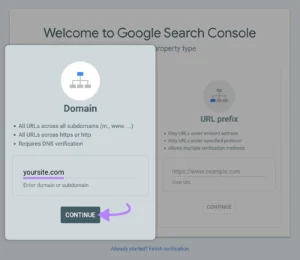
Visit Google Search Console and add your domain as a new property.
You can choose between:
- Domain property (recommended)
- URL prefix property
Domain properties track all subdomains and protocols.
Step 2 — Verify Ownership
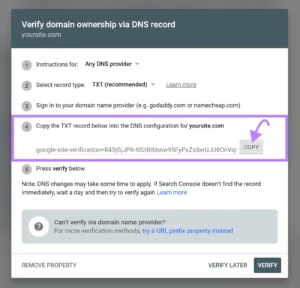
Google requires proof that you own the website.
Common verification methods include:
- DNS verification
- HTML file upload
- HTML tag
- Google Analytics integration
- Google Tag Manager
For most businesses, DNS verification is the most reliable method.
Step 3 — Submit Your Sitemap
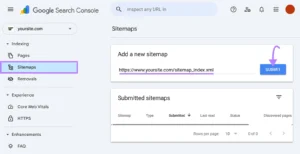
Once verified, submit your sitemap:
https://yourdomain.com/sitemap.xml
This helps Google discover your content faster.
Step 4 — Monitor Reports
After setup, you should regularly monitor:
- Performance report
- Indexing status
- Page experience metrics
- Security issues
- Manual actions
SEO improvements should always be guided by real data from Google Search Console.
Common SEO Problems Google Search Console Helps Solve
Businesses often struggle with SEO when they don’t understand the underlying issues.
Google Search Console helps diagnose problems such as:
Low click-through rates
Even if pages rank well, poor titles and meta descriptions can reduce CTR.
Indexing issues
Many websites have pages that Google cannot properly index due to technical errors.
Slow website performance
Poor Core Web Vitals can negatively affect both rankings and user experience.
Keyword opportunities
Google Search Console reveals keywords where your site ranks on page 2 or 3 — ideal opportunities for optimisation.
How Trech Hub Uses Google Search Console for SEO Growth
At Trech Hub, Google Search Console plays a central role in our SEO strategy.
We use advanced GSC analysis to:
- Identify high-value keyword opportunities
- Improve indexing and crawl efficiency
- Optimise page experience metrics
- Increase organic traffic through data-driven SEO
- Monitor technical SEO health
Our team combines Google Search Console insights with professional SEO expertise to help businesses achieve sustainable search visibility.
Our Google Search Console optimisation services include:
- Full SEO audits
- Technical SEO fixes
- Keyword optimization
- Core Web Vitals improvements
- Indexing and crawl management
- Search performance reporting
Rather than relying on guesswork, we use real search data directly from Google.
Why Businesses Should Work With SEO Experts
While Google Search Console provides valuable data, interpreting it correctly requires expertise.
Many businesses:
- Misinterpret search data
- Ignore technical errors
- Miss ranking opportunities
Professional SEO specialists can transform raw data into actionable strategies that drive traffic and revenue.
At Trech Hub, we help companies convert search insights into measurable growth.
Conclusion
Google Search Console remains one of the most powerful SEO tools available in 2026. It provides direct insight into how Google sees your website and helps identify opportunities to improve visibility, performance, and rankings.
However, simply having access to the data is not enough. Businesses need a clear SEO strategy to translate that information into real results.
If you want to fully leverage Google Search Console and improve your organic search performance, working with experienced SEO professionals can make a significant difference.
Trech Hub specialises in data-driven SEO strategies that turn search insights into business growth.